Usage Guide
Overview
The Usage section of this guide provides some examples of how to use Microsoft Dynamics Workspaces in combination with your Amazon Connect Contact flow module in your contact centre. Customer Contact Identification and Screen Pop Using Microsoft Dynamics, you can identify repeat customers using contact information stored in your Dynamics 365 database. This article explains how to create a voice scenario that
- Uses the Microsoft Dynamics Search Object to use the caller’s phone number to search for the contact in the CRM database
- Creates a timeline activity entity, based off interaction type; phonecall, chat
- Finds a skilled agent and connects the call
Pre Requisites
If you have not already done so, please complete Dynamics Agent Desktop integration configuration and installation of the Amazon Connect Contact Flow Module (D365-Integration-module)
Note: Scenarios utilizing Microsoft Dynamics blocks require referencing exact Microsoft entity terminology. For more information about contact objects, see Microsoft’s Contact Entity Reference.
Amazon Connect – D365 Integration Module Overview
This module integrates with existing Amazon Connect contact flows to provide seamless interaction with Microsoft Dynamics 365 (D365). It facilitates caller identification, data retrieval, and interaction logging directly to the customer’s timeline within D365.
Key Functions
-
Caller Identification Matches incoming contact data (e.g., phone number, or email address) against D365 records to identify the customer.
-
Customer Data Retrieval Retrieves relevant customer information from D365 to support personalized handling.
-
Slug Data Management Sets D365 Slug Data, used by the Microsoft CIFramework (CIF v2) API to support:
- Notifications
- Session creation
- Application template loading
- Activity Logging
-
Logs call details and context into D365, enabling a complete view of customer interactions.
Use Case Voice
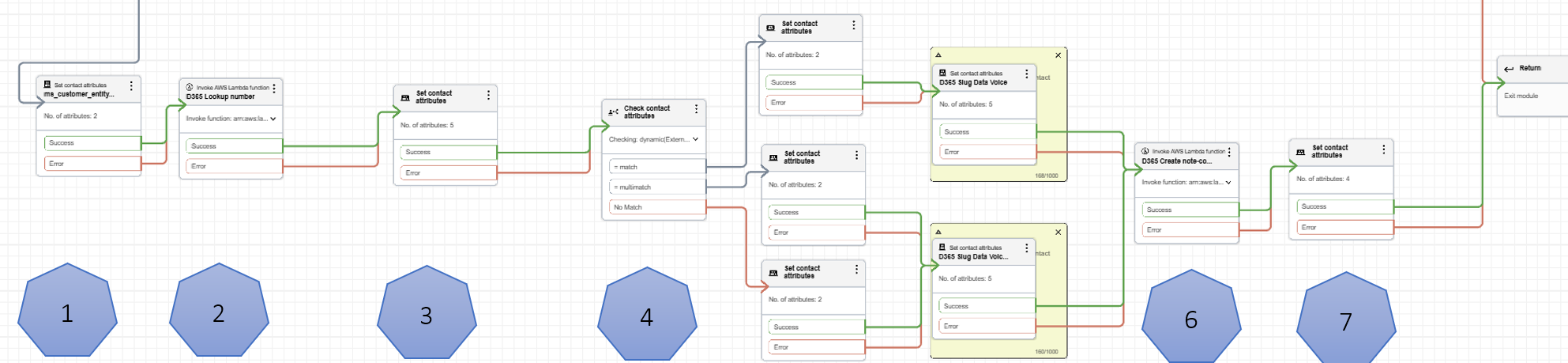
This module is ideal for organizations using Amazon Connect with Dynamics 365 Customer Service Workspaces and the Channel Integration Framework (CIF) v2. It enables contextual and efficient agent experiences by ensuring that customer data is available and actionable during live interactions.
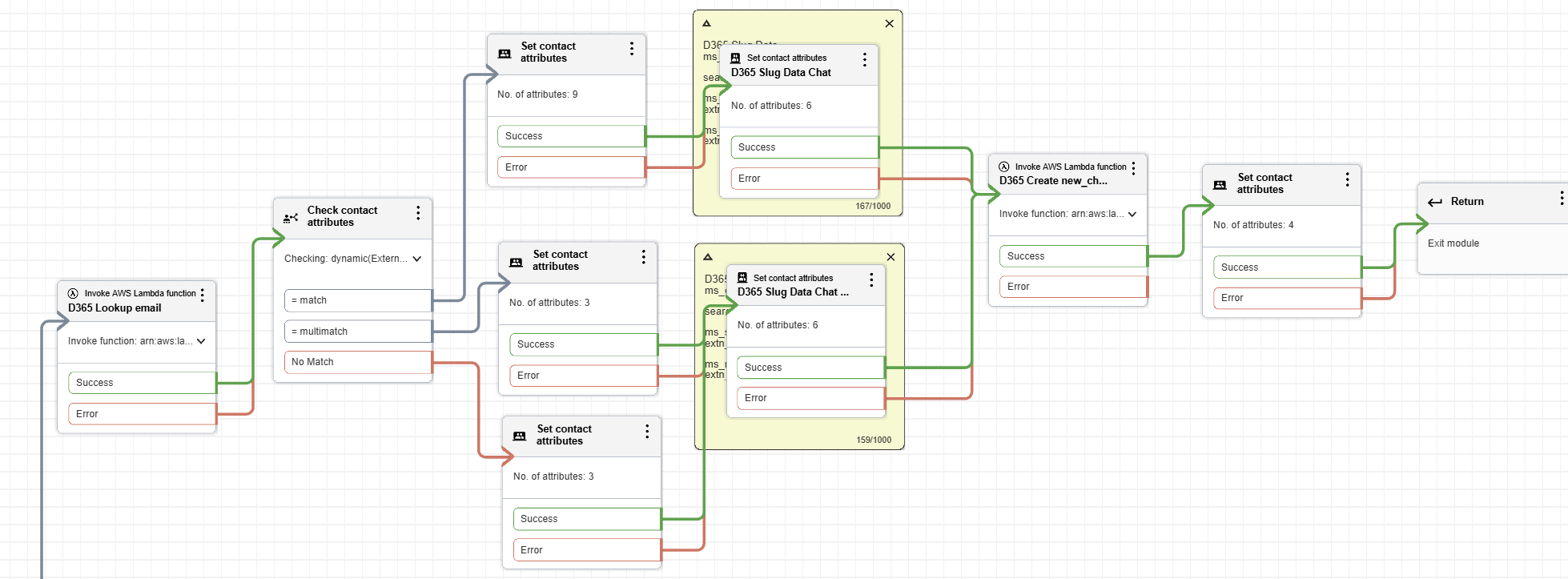
| Step | Name | Attributes and Values |
|---|---|---|
 |
Initialize Contact | ms_customer_entity_name = contact phoneNmber = $.System.CustomerNumber |
 |
Customer Lookup | DynamicsAPILambda ms_operation = lookup entity = ms_customer_entity_name |
 |
Store Lookup Results | ms_contact_id = $.External.contactid ms_customer_name = $.External.fullname ms_account_id = $.External.accountid ms_id = $.External.contactid CreateTimeline = true |
 |
Match Type Logic | $.External.outcome - match ( $.LookupSatus = SingleMatch ) - multimatch ( $.LookupSatus = MultiMatch ) - no-match ( $.LookupSatus = NoMatch ) |
 |
Match Handling (match) | ms_session_template = extn_voice_identified_session ms_notify_template = extn_voice_notification CallReason = transcript ms_searchType = contact ms_searchText = phoneNumber |
|
Match Handling (multi/no match) | ms_session_template = extn_voice_identified_session ms_notify_template = extn_voice_notification CallReason = transcript ms_searchType = contact ms_searchText = phoneNumber |
 |
Log Activity | DynamicsAPILambda ms_operation = addnote entity = phonecall ms_contact_id = ms_contact_id ms_customer_entity_name = ms_customer_entity_name |
 |
Store Activity Info | ms_activity_id = $.External.activityid ms_entityrecord_entity_name = phonecall ms_entityrecord_record_id = $.External.activityid CreateTimeline = true |
Dynamics Agent Experience Profile Desktop integration has multiple components and templates which makes for a rich agent experience. Here is a simplified diagram for quick reference:
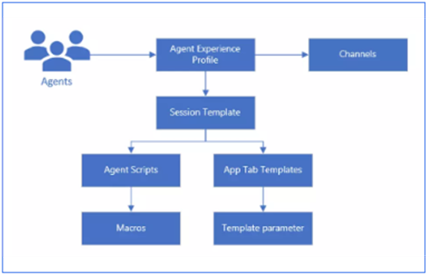
Note: The configuration can be accessed from Customer Service admin centre > Agent experiences > Workspaces.
The triggered agent experience for a voice interaction from Dynamics Customer Service Workspace screen is an Interconnections between Template components:
- Templates → Notifications: Templates are used to design the content of the notifications sent to agents.
- Notifications → Sessions: A notification is often triggered by a specific event that happens during a Session (e.g., incoming interaction voice call, chat).
- Sessions → Applications: A session is initiated when a system receives an interaction interacts with an Application (e.g., displaying an entity customer contact record, phone/chat activity timeline record, etc.).
- Applications → Templates: Applications (such as a customer contact entity, activity entity) use Templates to display consistent content, such as timeline activities, emails, etc.
The scenario below will show the results screen for a ‘single-match’ voice calls:
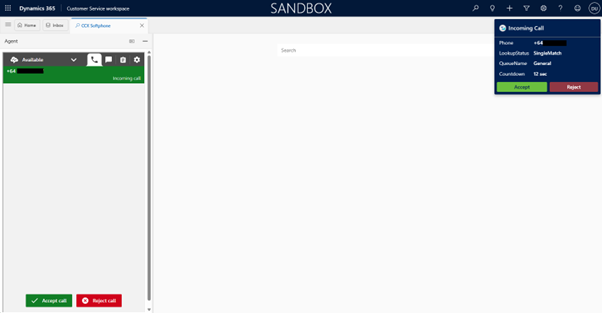
1. User logs into Customer Service Workspace, along with Amazon Connect softphone (CCP) using SSO. Going Available on the CCP the notification displays the incoming call information of a queued call. This configuration is driven by the notification template.
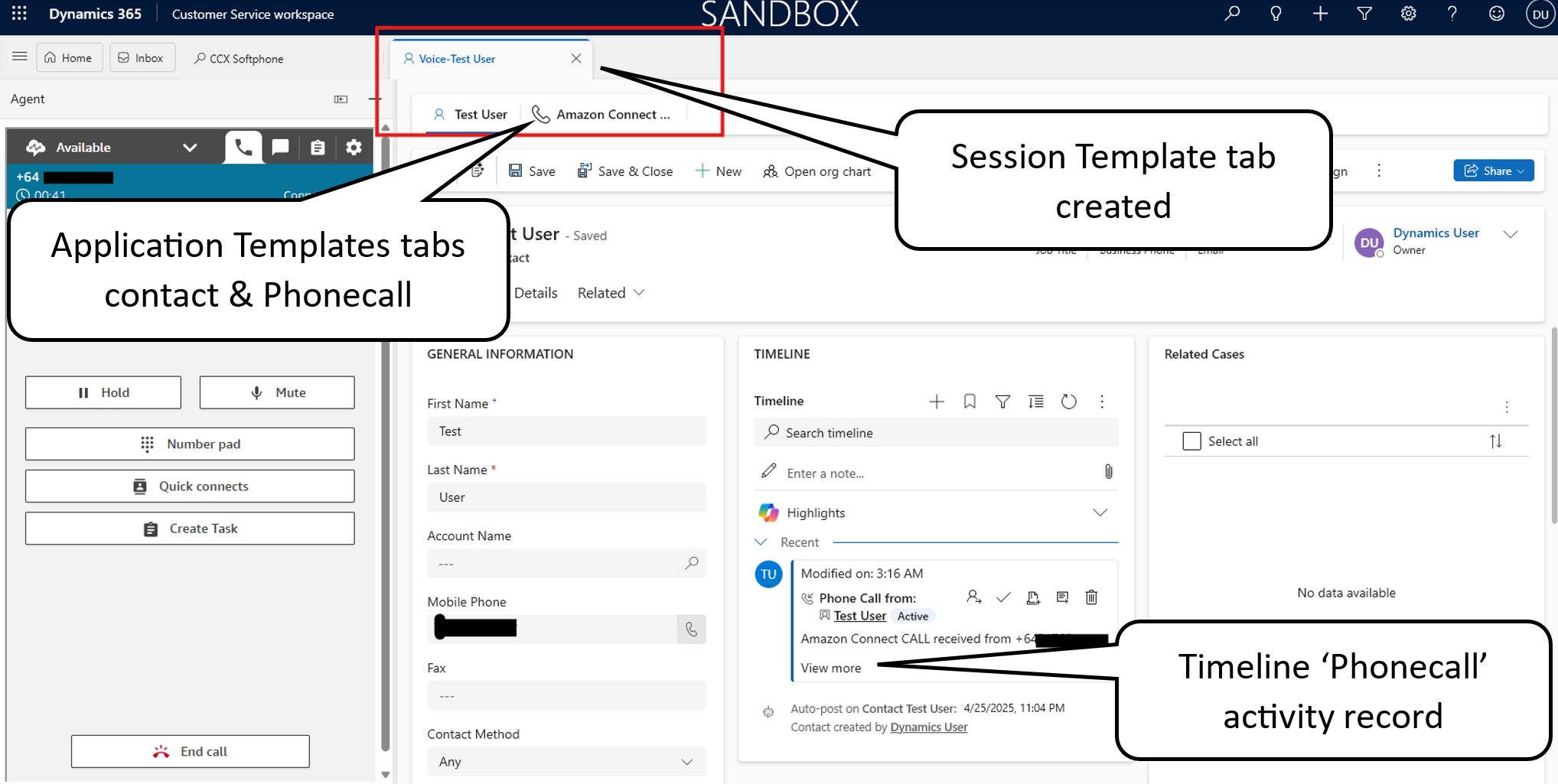
2. Once the call is accepted, Customer Service Workspace utilizing a combination of session and app templates to display the customer’s name in session tab title. This configuration is driven by a session template.
3. The customer record is automatically opened, along with a timeline phonecall activity record as additional tabs. These tabs are configured via app tab templates.
Notifications displayed (top right) detailing information from the customers contact (phone number) lookup within the contact flow module.
In the example highlighted below within the red-square; the main session template, title: Voice-{customerName} with anchor app tab template of contact entity record and the newly created timeline activity entity phonecall record in another app tab template.
Chat:
Task: