Amazon Connect Setup
This sections provides guidance on how to configure your Amazon Connect flows to perform lookups and create Engagements in your HubSpot account.
HubSpot Integration Module Overview
This module can be used in existing Amazon Connect contact flows to provide caller identification and data retrieval.
Key Functions
Caller Identification
- Matches incoming contact data (e.g., phone number, or email address) against HubSpot records to identify the customer.
Customer Data Retrieval
- Retrieves relevant customer information from HubSpot to support personalized handling.
Use Case - Voice
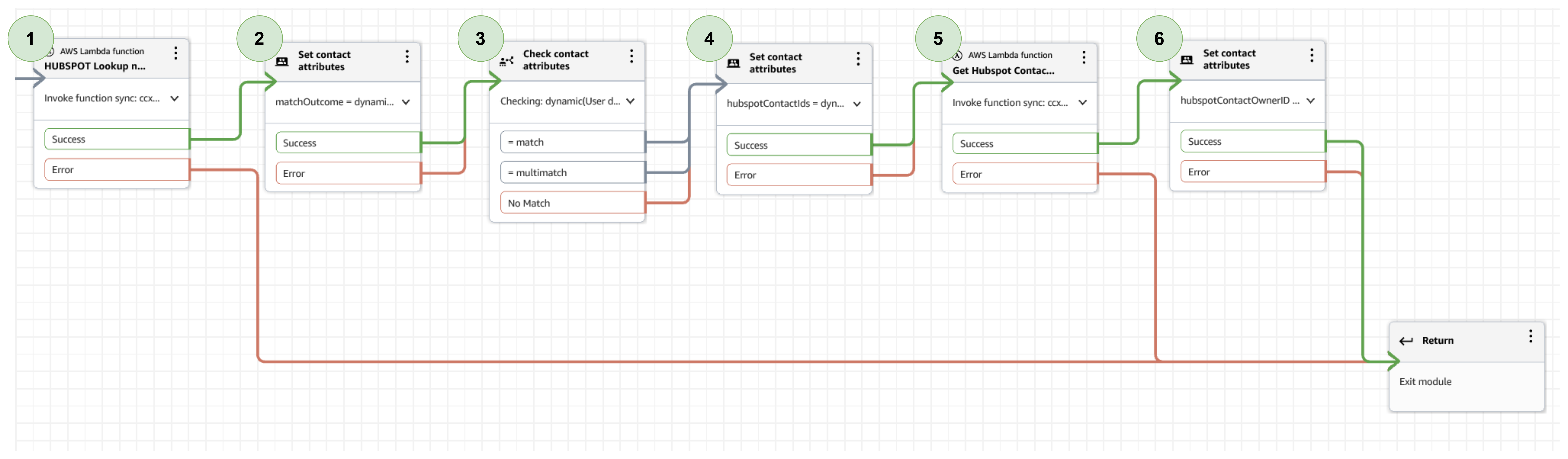
| Step | Name | Attributes and Values | Comments |
|---|---|---|---|
| 1 | AWS Lambda Function | hs_operation = lookupByMobileAndPhone hs_entity = contact lookup_value = $.System.CustomerAddress |
This lambda call will lookup all Contacts in your HubSpot account that have either a matching HubSpot Phone or Mobile. This lambda will return a comma separated list of HubSpot Contact IDs if multiple contacts are found |
| 2 | Set contact attributes | matchOutcome = $.External.outcome | Store the lambda lookup outcome |
| 3 | Check contact attributes | Example of potential match outcomes for routing decisions | |
| 4 | Set contact attributes | hubspotContactIds = $.External.hscontactIds | Comma separated list of HubSpot Contact IDs for matching Contacts or Contact ID of No Match default profile provided during setup |
| 5 | AWS Lambda Function | hs_operation = getHSContactAttribute returnAttribute = hubspot_owner_id HubspotContactID = $.Attributes.hubspotContactIds |
This lambda call returns specified HubSpot Contact attributes. Comma separated list of HubSpot contact ID can be provided. returnAttribute must match HubSpot Contact API object definition |
| 6 | Set Contract Attributes | hubspotContactOwnerID = $.External.attributeValues | Store the lambda result |
Use Case - Chat
| Step | Name | Attributes and Values | Comments |
|---|---|---|---|
| 1 | AWS Lambda Function | hs_operation = lookupByEmail hs_entity = contact lookup_value = $.Attributes.CustomerEmail |
This lambda call will lookup all Contacts in your HubSpot account that have either a matching email address in HubSpot. This lambda will return a comma separated list of HubSpot Contact IDs if multiple contacts are found |
| 2 | Set contact attributes | matchOutcome = $.External.outcome | Store the lambda lookup outcome |
| 3 | Check contact attributes | Example of potential match outcomes for routing decisions | |
| 4 | Set contact attributes | hubspotContactIds = $.External.hscontactIds | Comma separated list of HubSpot Contact IDs for matching Contacts or Contact ID of No Match default profile provided during setup |
| 5 | AWS Lambda Function | hs_operation = getHSContactAttribute returnAttribute = hubspot_owner_id HubspotContactID = $.Attributes.hubspotContactIds |
This lambda call returns specified HubSpot Contact attributes. Comma separated list of HubSpot contact ID can be provided. returnAttribute must match HubSpot Contact API object definition |
| 6 | Set Contract Attributes | hubspotContactOwnerID = $.External.attributeValues | Store the lambda result |
Agent Whisper Flow Overview
The 'HubSpot-AgentWhisper-Template' demonstrates how to create Engagements in HubSpot against HubSpot Contacts you have matched via the HubSpot lookup function. This is set in the Agent Whisper flow so that Engagements are only created when an agent answers the call. You can move the Engagement creation invoke block to another flow if you prefer to create an Engagement for any inbound call, even if it was not answered.
Outbound Whisper Flow Overview
The 'HubSpot-OutboundWhisper-Template' demonstrates how to do a lookup of the outbound CLI and and create an Engagement against the HubSpot Contact if one exists.
This outbound flow needs to be set as the outbound whisper flow on the required outbound queue. Or the example template needs to be added to the existing outbound whisper flows.
HubSpot Email to task Integration
-
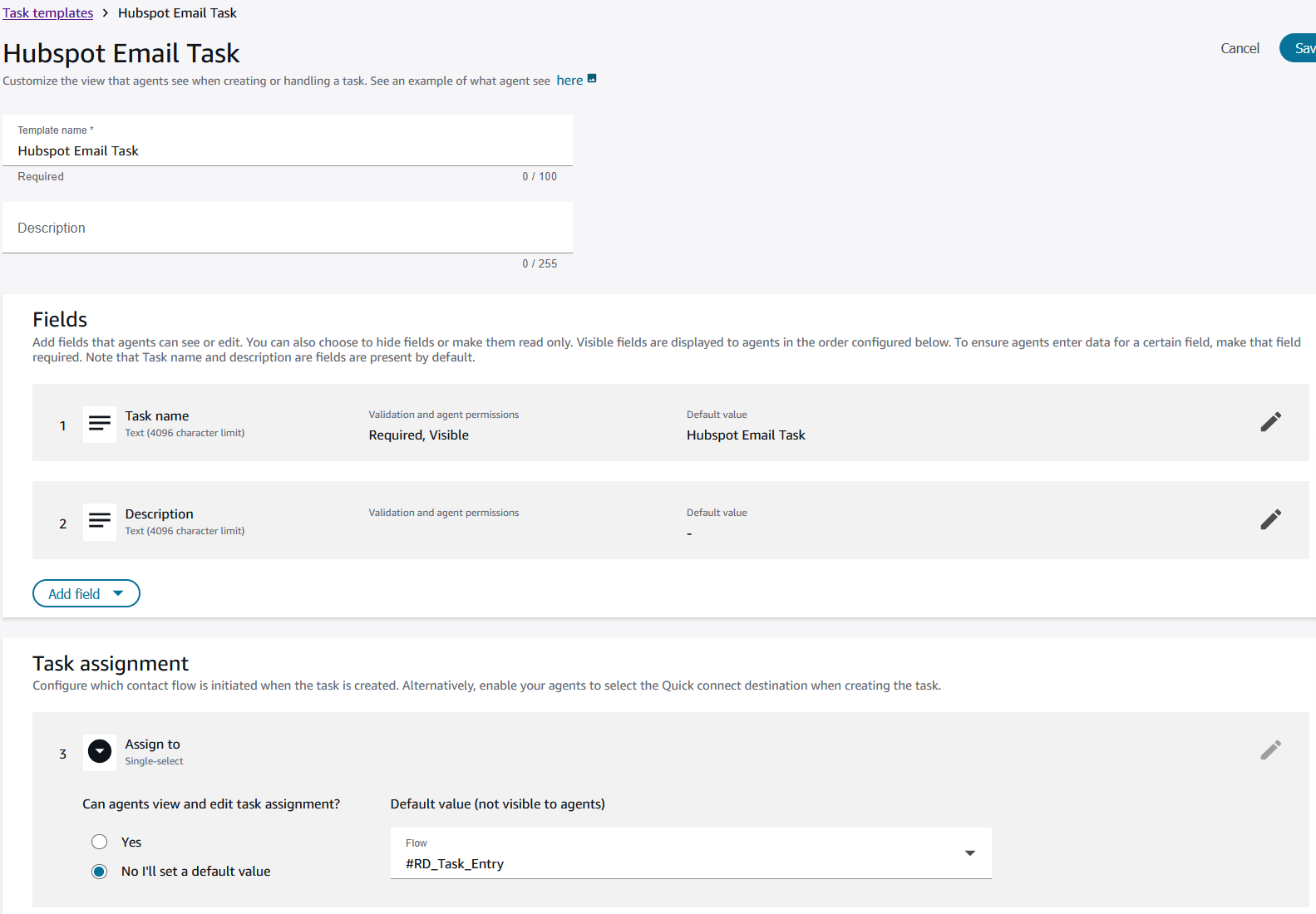
To route inbound emails to HubSpot as tasks in Amazon Connect, first create a Task Template.
The only required fields in the task are Task Name and the Task Assignment routing flow.
-
In the AWS Console, go to the 'ccx-hsManageEmailTask' Lambda. Under Configuration -> Environmental variables, update the taskTemplateID with the ID for the template you just created.
-
When the ccx-hsManageEmailTask Lambda is triggered, it creates a task using the Task Template provided and adds the following attributes:
- Hubspot_Channel - The HubSpot channel where the email was received.
- Hubspot_Conversation_ID - The unique ID for the HubSpot conversation thread.
- Hubspot_Owner - The username of the user assigned to the conversation in HubSpot.
- Hubspot_URL - The URL that opens the conversation thread directly in the HubSpot inbox.
- connectUserID - The Lambda uses HubSpot_Owner (if present) to look up the matching Amazon Connect user ID.